
If you’re just starting an online business, using a free WooCommerce theme is the smartest move you can make. Here’s why:
- You don’t need to spend money on a theme to get started. A well-chosen free WooCommerce theme already covers everything your store needs — product pages, cart, checkout, mobile responsiveness, and SEO basics. Save your budget for things that matter more, like products, marketing, and hosting.
- Free themes today are genuinely good. The days of free themes feeling half-finished are long gone. The options on this list are actively maintained, fast, and built to the same technical standards as many paid themes.
- Starting lean helps you focus. When you’re new, a simple, clean theme forces you to focus on what actually drives sales — your products and your customers — instead of spending hours tweaking design settings.
- You can always upgrade later. Once your store is generating revenue and you have a clearer idea of what you need, switching to a premium theme or upgrading to a Pro version is always an option. But for getting started, free is more than enough.
Haven’t installed WooCommerce yet? Before choosing a theme, make sure WooCommerce is set up on your WordPress site. Read our guide on how to install WooCommerce →
Now, with thousands of WordPress themes available, the challenge isn’t finding a free one — it’s finding the right one. A lot of themes out there support WooCommerce without being built for it. You’ve probably seen the big multipurpose themes that promise to handle everything: blogs, portfolios, agencies, and online stores all in one package. They can work, but they often carry unnecessary code and complex settings that slow your store down.
Every theme on this list is different. All of them were designed and built specifically for WooCommerce online stores. We haven’t included multipurpose themes that simply add WooCommerce compatibility as an afterthought — this list is dedicated eCommerce themes only.
Here’s what we evaluated each theme on:
- Performance — Does it load fast on both desktop and mobile?
- WooCommerce compatibility — Does it support product pages, cart, and checkout natively?
- Ease of customization — Can you set it up without writing code?
- Active maintenance — Is it regularly updated and supported?
- Plugin compatibility — Does it play nicely with the tools you already use?
Let’s get into it.
The 7 Best Free WooCommerce Themes
Below is our curated list of the best free WooCommerce themes available in 2026. Each one has been selected because it was built specifically for online stores — not adapted from a general-purpose theme. You’ll find options for every kind of store owner: those who prefer the native Block Editor, those building with Elementor, and those who just want the simplest possible setup to get selling fast.
1. Kubelio — Minimal Gutenberg WooCommerce Theme
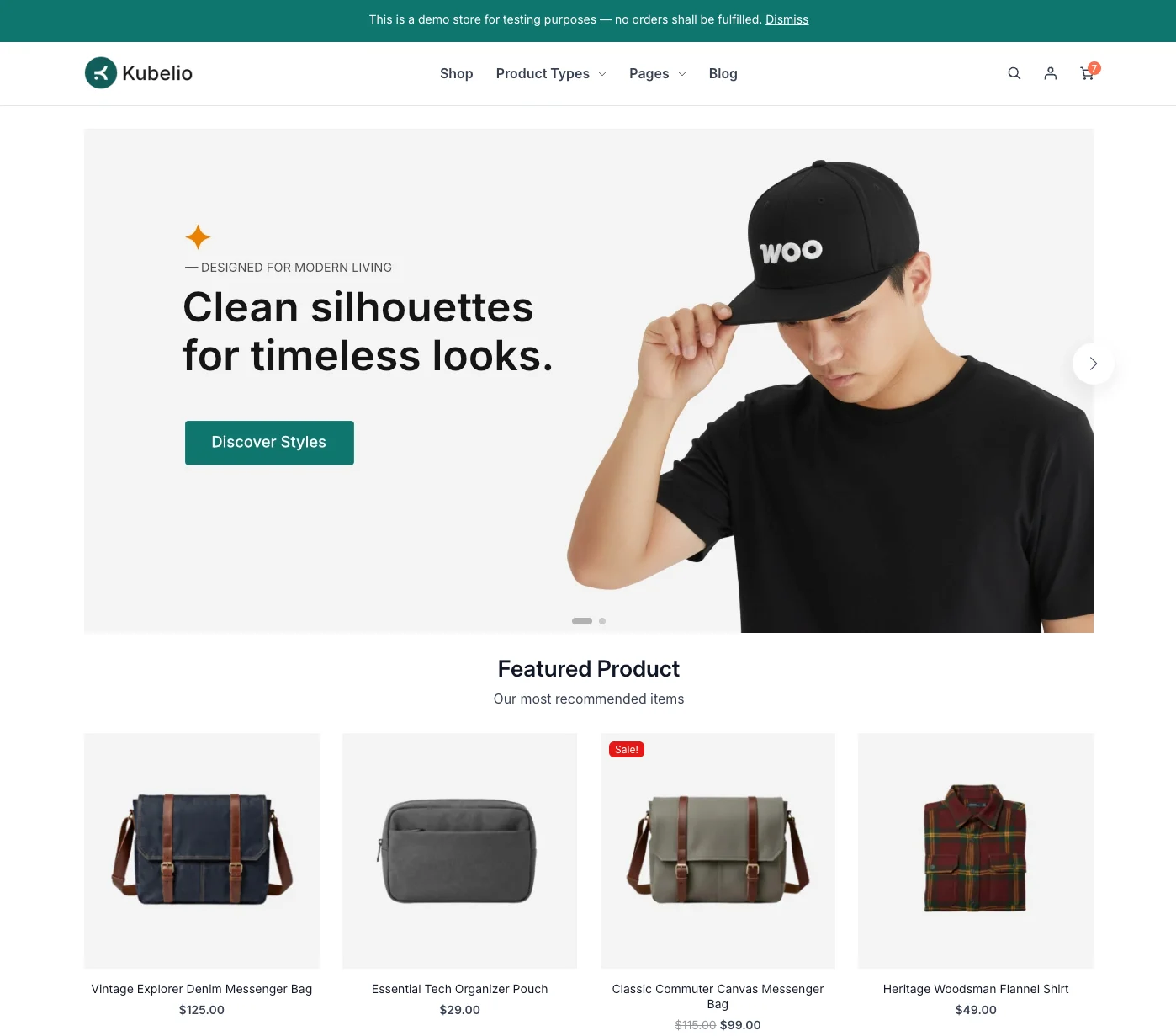
If you want something that loads fast, looks clean, and doesn’t require a steep learning curve — Kubelio is where you should start.
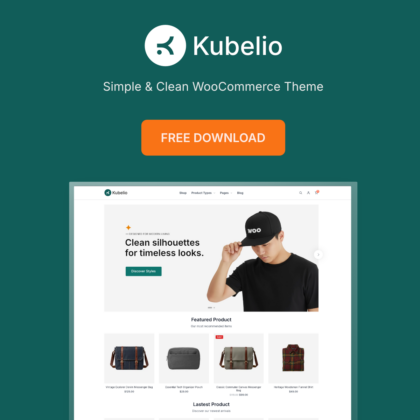
We built Kubelio specifically for WooCommerce store owners who want a truly minimal setup without relying on Elementor, WPBakery, or any other page builder. Instead, it uses the native WordPress Block Editor (Gutenberg) to build and customize the homepage. That means fewer plugins, a lighter codebase, and a store that performs well right out of the box.
The design philosophy is simple: your products should be the focus, not the theme. White space, clear typography, and a distraction-free checkout layout guide your customers toward completing their purchase.
Free Features:
- Homepage built with the native WordPress Block Editor — no page builder needed
- Minimal CSS and JavaScript for fast loading performance
- Clean, minimal storefront design focused on product visibility
- Dedicated checkout page template — distraction-free layout designed to reduce cart abandonment
- Full WooCommerce core compatibility including WooCommerce Blocks
- Customizable colors and typography via the WordPress Customizer
- 100% free — fully functional store without any upsell
What We Like:
- Built on the WordPress Block Editor, so you don’t need any additional page builder — the site stays lighter and more native to WordPress
- Minimalist design keeps the focus entirely on your products
- Dedicated checkout page template — not many free themes include this out of the box
- Very beginner-friendly: from install to live store in under 10 minutes
Worth Noting:
- Only one demo template available at this time
- Not yet listed on WordPress.org — you need to download it directly from kubelio.com
Best suited for: Small business owners, local shops, one-product stores, digital product sellers, and WooCommerce beginners who want to go live quickly without the complexity of a page builder.
“We built Kubelio because we couldn’t find a theme that was truly minimal, fast, and optimized for digital product stores — so we built one ourselves.” — Kubelio Team
2. Storefront — The Official WooCommerce Theme
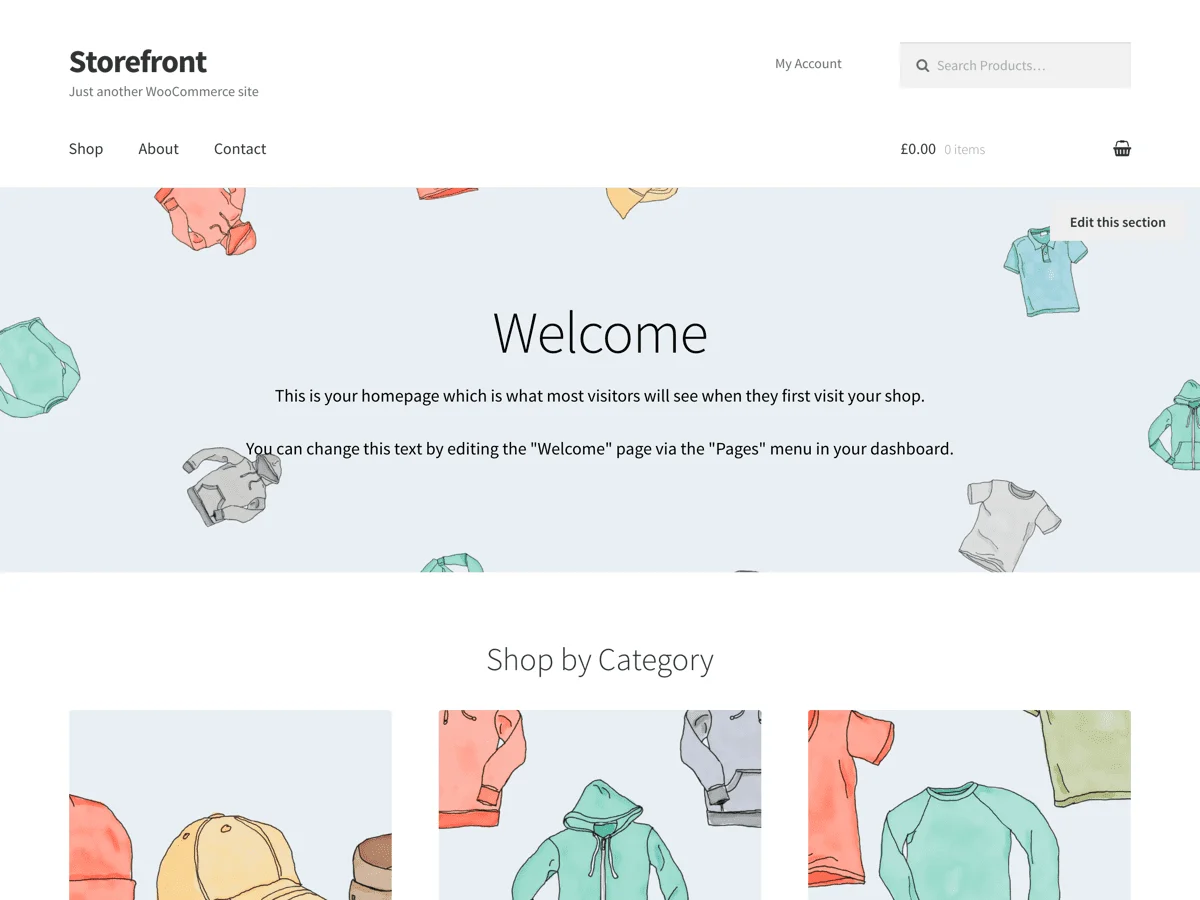
If compatibility and long-term stability are what you’re after, Storefront is your safest bet. It’s the official WooCommerce theme, built and maintained by Automattic — the same team behind WordPress and WooCommerce.
Because Storefront is developed alongside WooCommerce itself, it gets updated every time WooCommerce does. That means you’re unlikely to run into compatibility issues when updating your store — which is a real problem with many third-party themes.
The free version is intentionally simple. You get a clean layout, basic customization options, multiple widget areas, and a customizable header and footer. It won’t wow you with fancy design, but it works reliably and does exactly what it promises.
Free Features:
- Developed and maintained directly by the WooCommerce core team
- Guaranteed compatibility with every WooCommerce update
- Full support for the latest WooCommerce Blocks
- Sticky add-to-cart buttons and store-wide announcement banners
- Multiple child themes for different niches (Boutique, Deli, Homestore, and more)
- Accessibility-ready (WCAG compliant)
- Available on WordPress.org — install directly from your dashboard
What We Like:
- 100% support for the latest WooCommerce features and blocks — always updated in sync with WooCommerce itself
- The most reliable long-term compatibility of any theme on this list
- Great foundation if you plan to extend with WooCommerce’s own official extensions
Worth Noting:
- No live preview demo or one-click demo import — you start from a blank slate
- Visual customization is limited in the free version; advanced features require the paid Storefront Extensions Bundle
Best suited for: Store owners who want rock-solid WooCommerce compatibility above everything else, and aren’t concerned about advanced visual customization.
3. Botiga — Fast, Clean, and Conversion-Focused
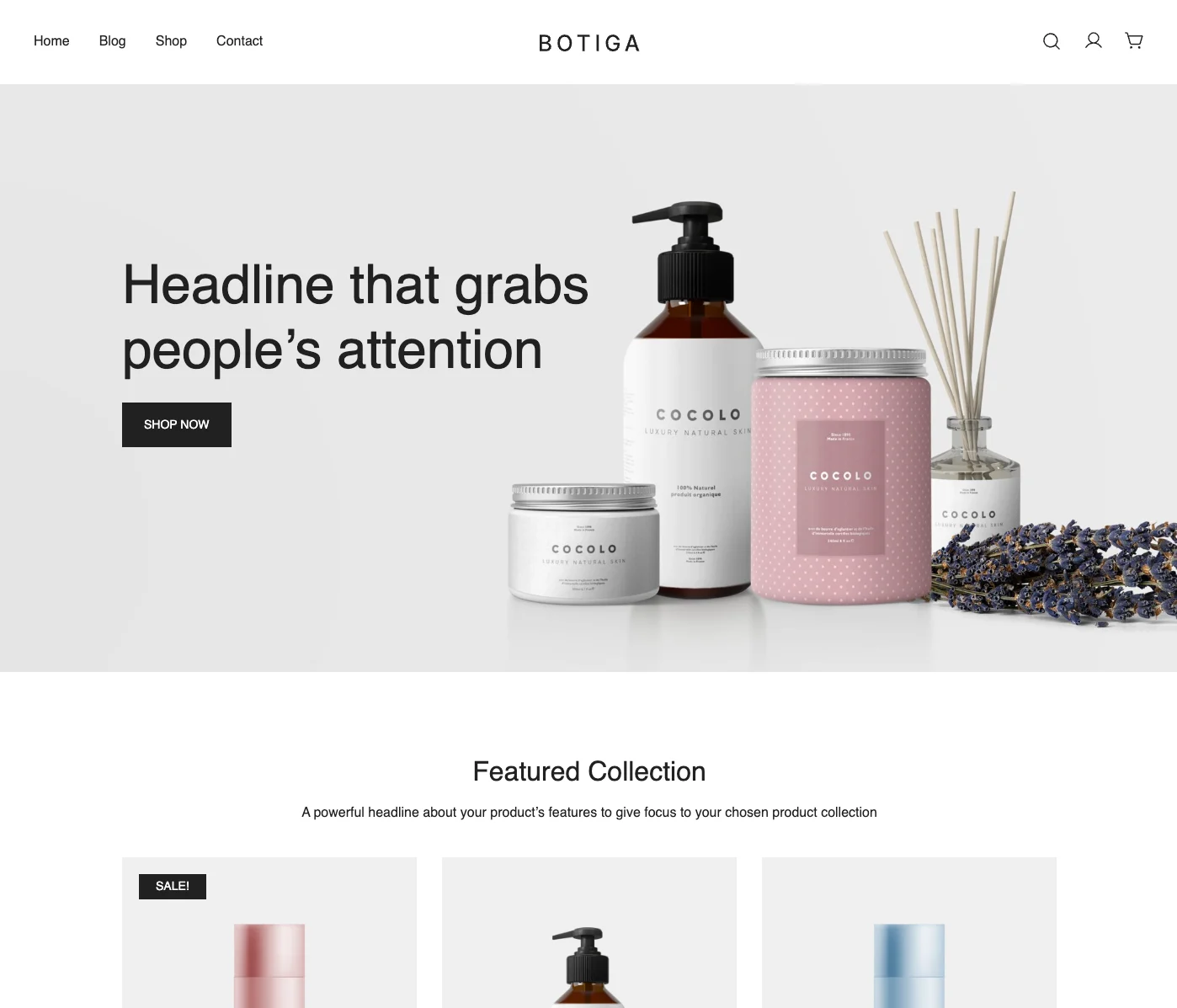
Botiga is one of the most popular free WooCommerce themes available right now — and once you see the performance numbers, it’s easy to understand why. Built by aThemes, it loads in under half a second and scores 100% on both Lighthouse and GTmetrix.
What really sets Botiga apart is how much you get in the free version. Most themes lock features like product quick view, Ajax cart, and product badges behind a paid upgrade. With Botiga, you get all of that for free. You also get multiple product gallery layouts, product filters, and product recommendations — all without installing extra plugins.
It works with both the WordPress Block Editor and Elementor, so you can build your store the way you prefer.
Free Features:
- Loads in under 0.5 seconds — scores 100% on Lighthouse and GTmetrix
- Product quick view and Ajax cart included free
- Product badges and product recommendations
- Three different product gallery layouts
- Drag-and-drop header and footer builders
- Pre-defined color palettes plus full custom color support
- Compatible with both Gutenberg and Elementor
- One ready-made demo site for quick setup
What We Like:
- Simple and clean design that works equally well with Block Editor and Elementor — you’re not locked into one approach
- Impressive free feature set: quick view, Ajax cart, product filters, and badges are usually paid-only
Worth Noting:
- Only one demo template available in the free version — limited starting-point variety
Best suited for: Store owners who want a visually polished, high-performance WooCommerce theme with premium-level features — all without paying a cent.
4. Woostify — Lightweight with Solid Starter Templates
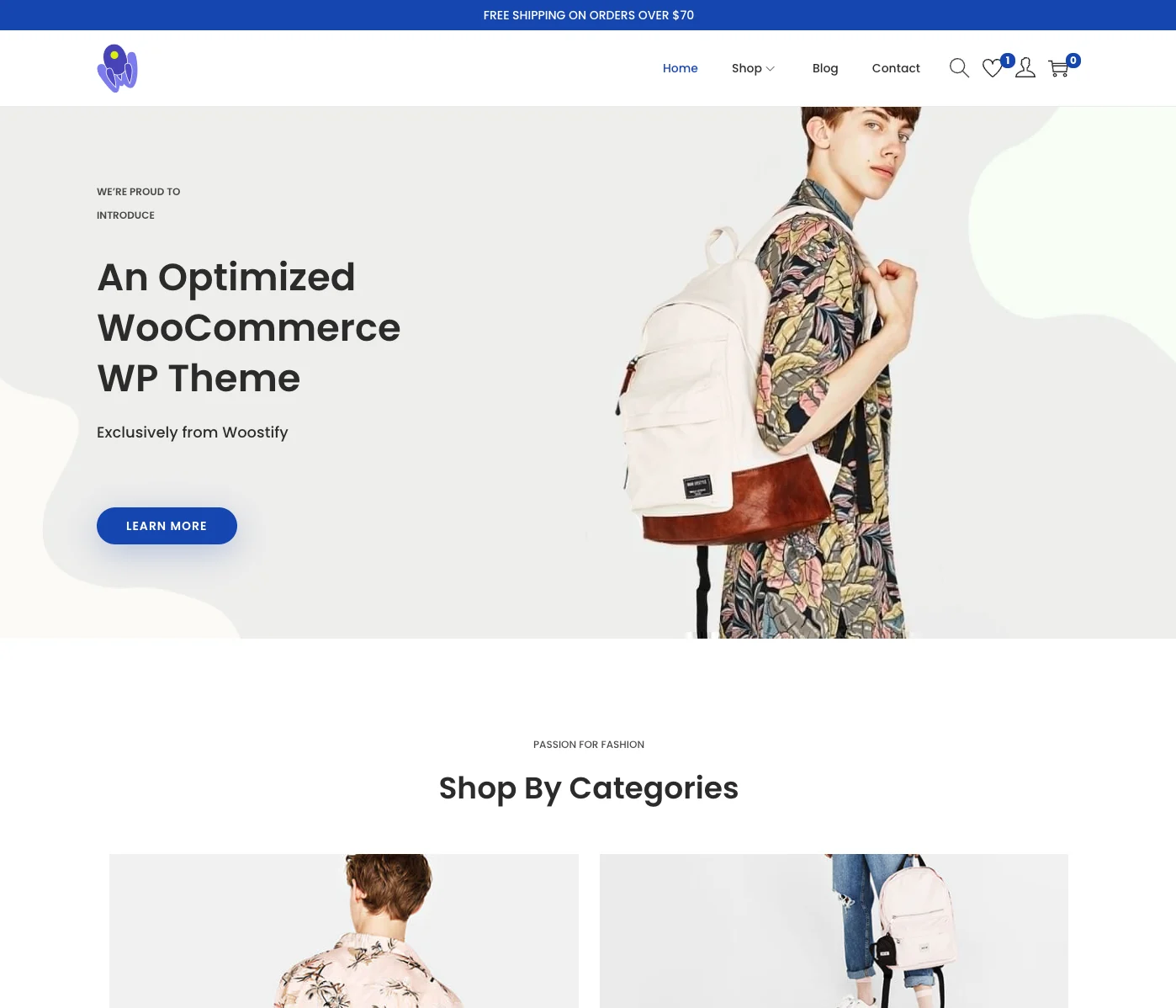
Woostify was built from scratch to be as lightweight as possible. No Bootstrap, no heavy CSS frameworks — just clean, minimal code. Its scripts are written in vanilla JavaScript, so there’s no full jQuery library loading in the background slowing things down.
In real-world tests, a Woostify-powered page weighing just 193 KB loaded in 775ms, earning a 98% performance score on GTmetrix. That’s impressive for an out-of-the-box setup.
It also has a useful catalog mode that hides all add-to-cart buttons, turning your store into a product showcase. If you run a wholesale or B2B store where customers need to contact you before ordering, this feature alone might seal the deal.
Free Features:
- No Bootstrap or heavy CSS frameworks — built lean from day one
- Vanilla JavaScript implementation (no full jQuery dependency)
- Sticky add-to-cart bar visible while scrolling
- Multiple product page and listing layout options
- Catalog mode — display products without enabling purchases
- Two cart layout styles (single row and full cart table)
- Compatible with Elementor, SiteOrigin, and Beaver Builder
- 3 free starter templates available for quick setup
What We Like:
- 3 free starter templates are available even in the free version — enough to get a real head start
- Ultra-lightweight codebase with no framework dependencies keeps load times low
Worth Noting:
- The full template library (15 templates) is unlocked with Woostify Pro — the free version has a smaller selection
Best suited for: Non-technical store owners who want a fast, clean foundation and pre-built starter templates — especially those using Elementor to design their pages.
5. Woovina — Best for Elementor Users Who Want Full Customization
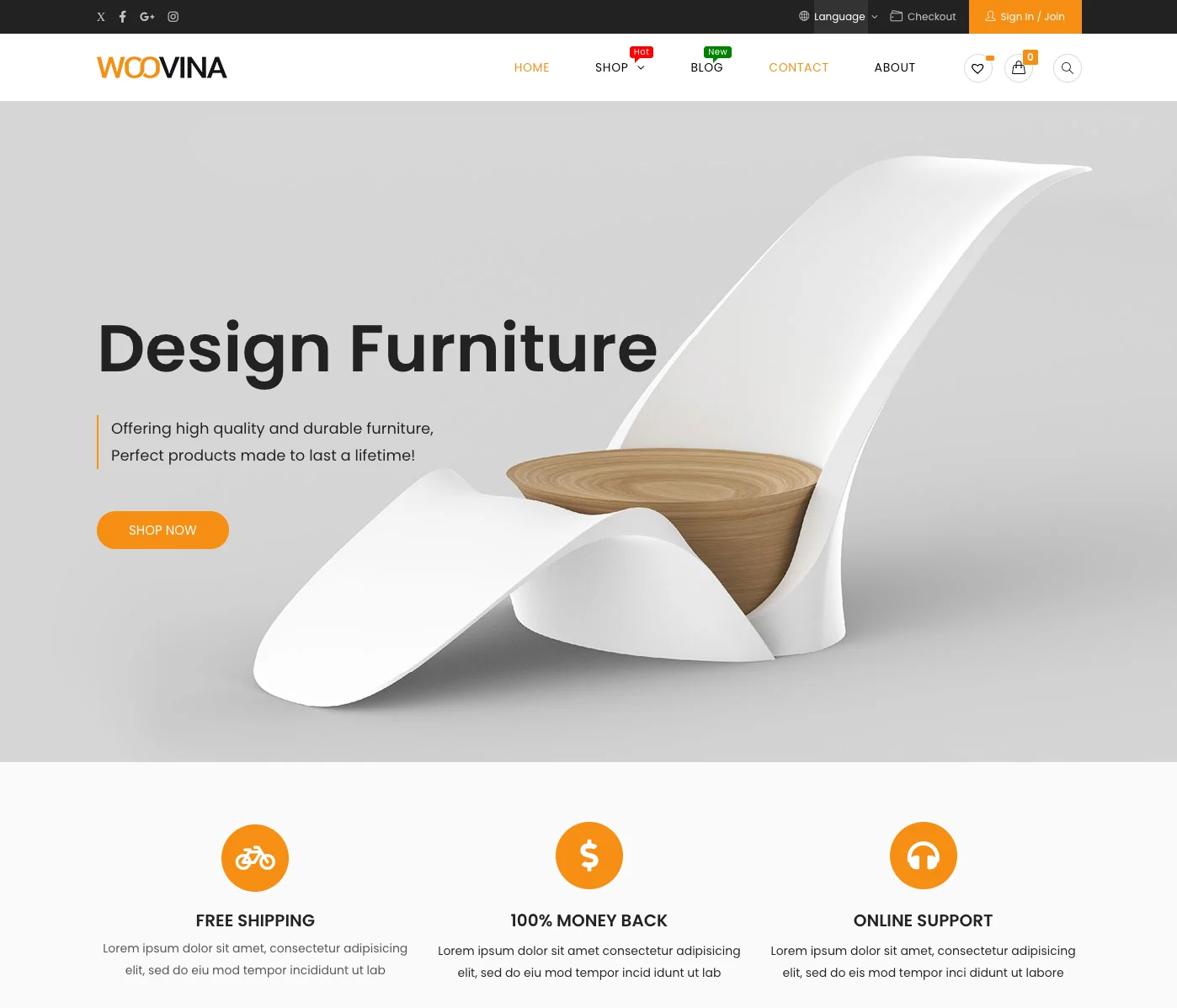
If you’re planning to build your store with Elementor, Woovina is one of the best free WooCommerce options built specifically with that workflow in mind. It’s been around since 2018 and has developed a loyal following among store owners who want deep, hands-on control over every part of their store — without touching code.
The standout feature is its library of ready-to-import starter sites — over 31 free templates and 90+ premium ones — covering niches from electronics and fashion to furniture and food. Pick a design that fits your store, import it in a few clicks, and you’ve got a fully structured WooCommerce store ready to customize.
Beyond templates, Woovina offers unusually deep WooCommerce integration through the WordPress Customizer. You can configure your shop page layout, single product page, cart, checkout, upsell/cross-sell counts, and more — all without writing a line of code. It even lets you enable or disable individual JavaScript and CSS components per page, so you only load what you actually need.
Free Features:
- 31+ free ready-to-import Elementor starter site templates
- Deep WooCommerce Customizer: shop, product, cart, and checkout all configurable
- Distraction-free checkout and cart mode
- Granular JS and CSS enable/disable controls per page
- Compatible with Elementor, Beaver Builder, Divi, and Visual Composer
- RTL language support
- Pre-built header and footer layouts
What We Like:
- 31+ free starter templates is the most generous free template library on this list
- Unusually deep WooCommerce Customizer settings — you can fine-tune nearly every part of your store without code
- Ideal if you prefer building with Elementor and want real layout variety from day one
Worth Noting:
- Not available on WordPress.org — you need to download it directly from woovina.com
Best suited for: Store owners who want to build with Elementor and need a wide selection of niche-specific starter templates combined with deep WooCommerce customization — all without coding.
6. Hello Commerce — Built by the Elementor Team, Made for WooCommerce
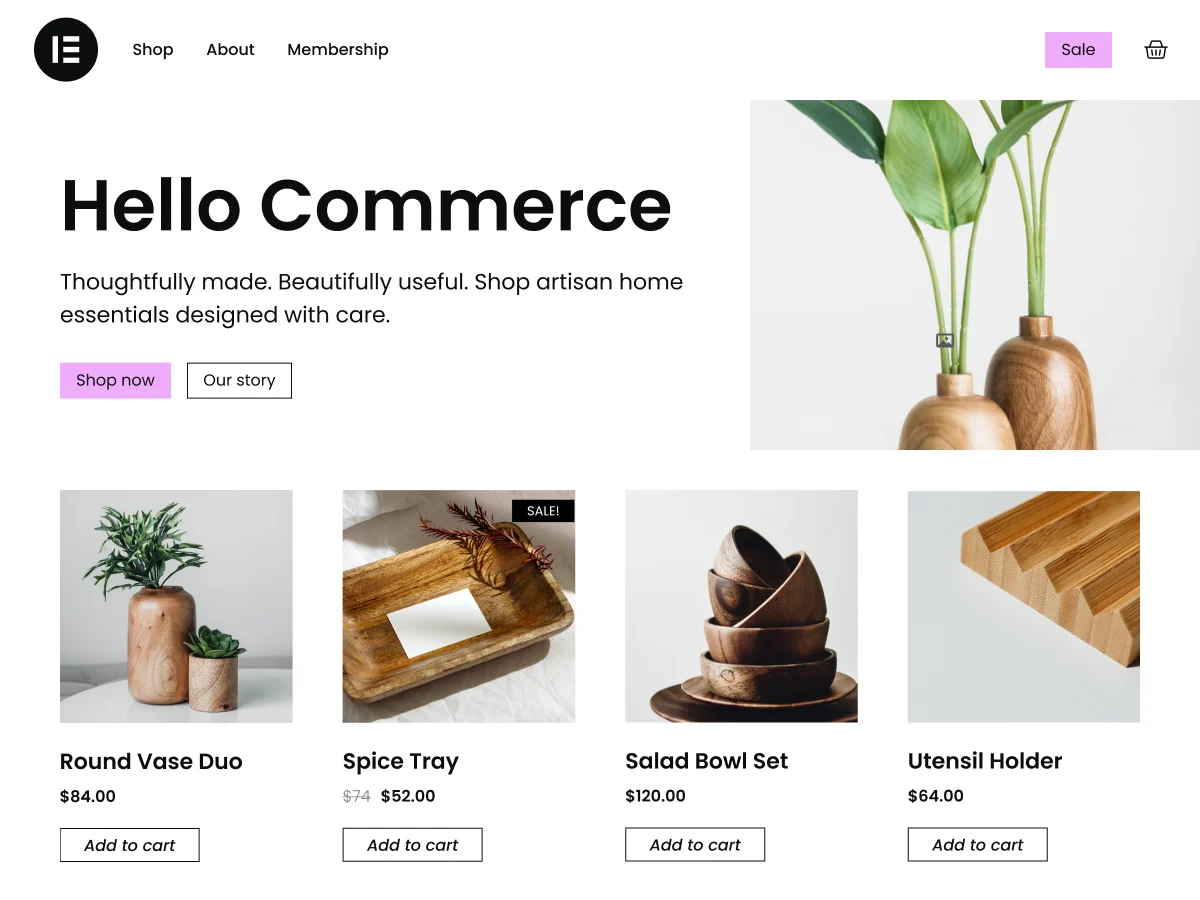
Hello Commerce is a free WooCommerce theme built by the Elementor team — the same people who made the Elementor page builder. If you’re going all-in on the Elementor ecosystem, this is the theme designed to go with it.
Unlike the original Hello Elementor theme (which is a general-purpose blank canvas), Hello Commerce was built specifically for online stores. It gives you intuitive controls to customize your product grids, cart, and checkout pages directly within the Elementor interface — no extra configuration needed. It also comes with complete site template kits so you can launch a professional-looking store quickly.
Because it comes from the Elementor team itself, Hello Commerce is guaranteed to stay perfectly in sync with Elementor updates. If you’re already committed to using Elementor Pro with its WooCommerce Builder, this theme removes any friction between your page builder and your store.
Free Features:
- Built by the Elementor team — 100% native Elementor and WooCommerce integration
- Product grid, cart, and checkout customization directly inside Elementor
- Complete site template kits for fast store setup
- Fast and lightweight codebase
- Beginner-friendly — no code required
- RTL language support
- Available on WordPress.org
What We Like:
- Dedicated WooCommerce + Elementor theme built by the same team — compatibility is 100% guaranteed
- Full Elementor Pro WooCommerce Builder support without any configuration friction
- Best choice if you’re already invested in the Elementor ecosystem
Worth Noting:
- No live preview demo available — you can’t see a styled store before installing
- Best used with Elementor Pro for full WooCommerce page customization; the free version of Elementor has limited WooCommerce template control
Best suited for: Store owners who are fully committed to the Elementor ecosystem — especially those using Elementor Pro — and want a WooCommerce theme built to work hand-in-hand with it.
Best suited for: Store owners who are fully committed to the Elementor ecosystem — especially those using Elementor Pro — and want a WooCommerce theme that’s built to work hand-in-hand with it.
7. Sbmart — Feature-Rich Free WooCommerce Theme with Multiple Layouts
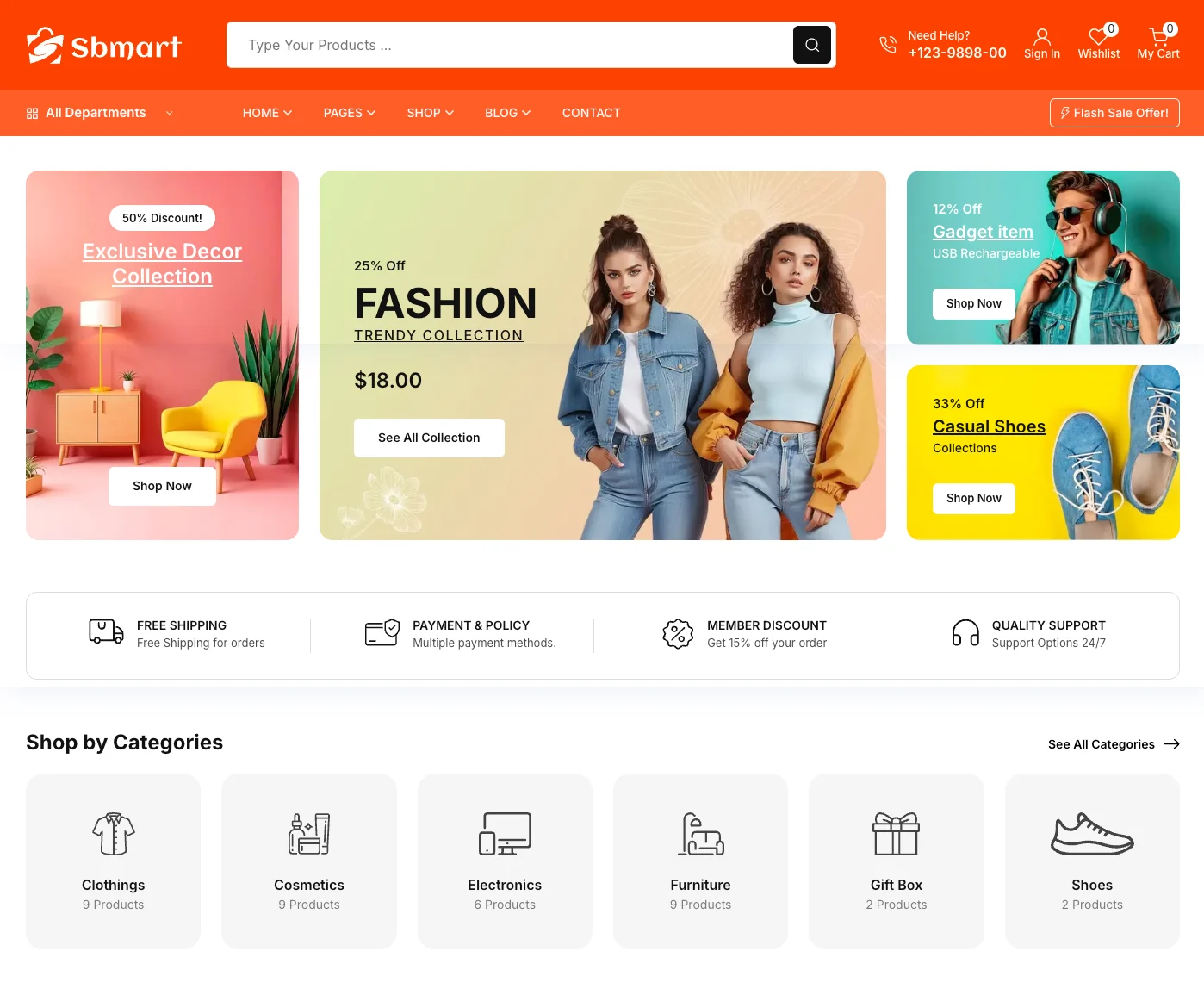
If you want a free WooCommerce theme that looks premium without paying for one, Sbmart is worth a close look. It’s built by the ShopBuilder team and packs in an impressive number of ready-made layouts — 15 pre-made shop and archive page designs, plus 6 distinct product detail page layouts — all available in the free version.
What makes Sbmart stand out is how much it handles out of the box. Product detail pages come with built-in support for variation swatches, pre-order, back-order, and product add-ons. These are features you’d normally need separate plugins for. The theme is also Elementor-compatible, so you can drag and drop to build or customize any page section without touching code.
It’s a solid pick if you’re running a store in any niche — clothing, cosmetics, electronics, furniture, or sports — and want a polished storefront without a premium price tag.
Free Features:
- 15 pre-made shop and archive page layouts (grid and list)
- 6 unique product detail page layouts
- Variation swatches, quick view, wishlist, and product comparison — all free
- Pre-order and back-order support built in
- Elementor-compatible for drag-and-drop page building
- 2 homepage layouts
- Lightweight, responsive, and SEO-optimized
What We Like:
- Most generous layout variety of any free theme on this list — 15 shop layouts and 6 product page styles give you real design flexibility
- Premium features like variation swatches, wishlist, and product comparison are included free — no plugins needed
- Works across virtually any niche without modification
Worth Noting:
- Not available on WordPress.org — download directly from shopbuilderwp.com
Best suited for: Store owners who want a visually rich, multi-layout WooCommerce theme with premium-looking product pages — all without spending money on a theme.
8. YITH Wonder — Full Site Editing WooCommerce Theme by YITH
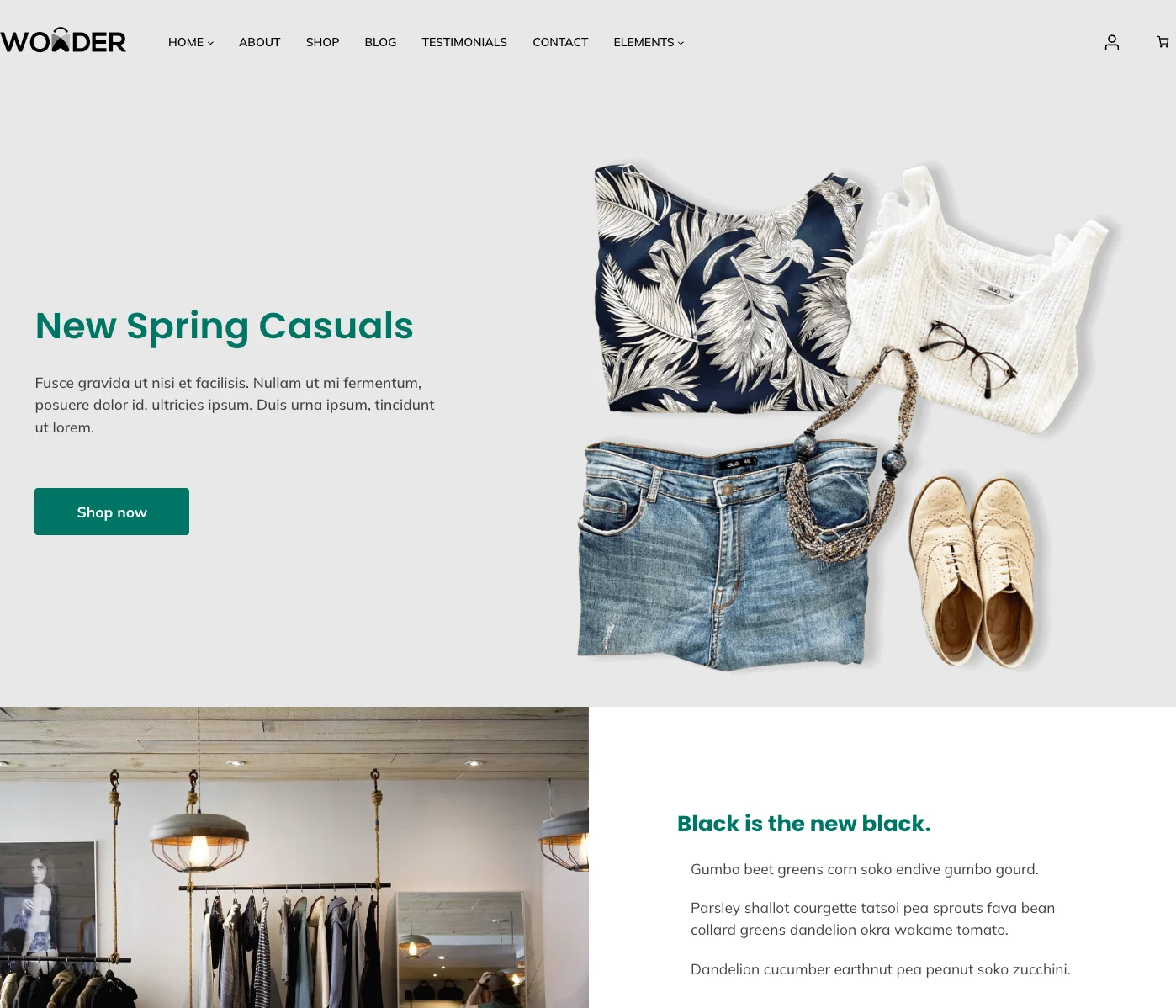
YITH Wonder is the only fully FSE (Full Site Editing) block theme on this list — and it comes from one of the most established names in the WooCommerce ecosystem. YITH is the company behind dozens of popular WooCommerce plugins, so when they built a theme, WooCommerce compatibility was built into every corner of it.
With Full Site Editing, you’re not using a page builder or a Customizer panel to adjust your store. Instead, everything — headers, footers, product page templates, shop pages, cart, and checkout — is edited directly inside the WordPress Site Editor using blocks. This makes Wonder one of the most future-proof themes on this list, built entirely around the direction WordPress itself is heading.
The theme ships with 8 style variations, 24+ block patterns (many WooCommerce-specific), 3 full-page homepage layouts, and a wide set of pre-built page templates. You can even launch a one-hour sandbox directly from its WordPress.org listing to test it with WooCommerce already pre-loaded — before installing anything.
Free Features:
- Full Site Editing (FSE) — edit headers, footers, and all templates via the WordPress Site Editor
- 8 style variations for instant color and typography changes
- 24+ block patterns including WooCommerce shop, cart, and checkout styles
- 3 full-page homepage layouts
- Pre-built page templates (About, Contact, Testimonials, Blog, and more)
- Wide collection of block styles for buttons, images, and quotes
- WooCommerce product catalog, cart, and checkout template integration
- Available on WordPress.org — install directly from your dashboard
- Fully compatible with all YITH WooCommerce plugins
What We Like:
- The only true Full Site Editing theme on this list — gives you complete control over every part of your store without a page builder
- Built by YITH, the most established WooCommerce plugin developer — compatibility with their plugin ecosystem is as good as it gets
- Currently the most-installed third-party FSE WooCommerce block theme on WordPress.org
Worth Noting:
- Full Site Editing has a steeper learning curve than traditional Customizer-based themes — if you’re new to WordPress, expect some adjustment time
- The FSE interface can feel unfamiliar if you’ve only ever used classic themes or page builders like Elementor
Best suited for: Store owners who want to embrace the full WordPress block editor experience and build a future-proof WooCommerce store entirely within the native Site Editor — no page builder, no Customizer.
Comparing All 8 Themes at a Glance
Not sure which free WooCommerce theme for your online store is the right fit? This table gives you a quick side-by-side view of all eight options — from the fastest WooCommerce theme free picks to the best WooCommerce theme for Elementor users. Use it to narrow down your choice before diving into the full descriptions above.
| Theme | Page Builder | Free Demo Templates | On WordPress.org? | Best For |
|---|---|---|---|---|
| Kubelio | Gutenberg only | 1 demo | Download from kubelio.com | Minimal stores, beginners, digital products |
| Storefront | None required | No demo import | Yes | Maximum WooCommerce compatibility |
| Botiga | Gutenberg or Elementor | 1 demo | Yes | Speed + polished design |
| Woostify | Elementor compatible | 3 free templates | Yes | Lightweight, Elementor users |
| Woovina | Elementor-focused | 31+ free templates | Download from woovina.com | Elementor users, template variety |
| Hello Commerce | Elementor (built-in) | 2 free templates | Yes | Full Elementor Pro ecosystem |
| Sbmart | Elementor compatible | 2 homepage demos | Download from shopbuilderwp.com | Multi-niche, layout-rich stores |
| YITH Wonder | FSE / Site Editor | 3 homepage layouts | Yes | FSE enthusiasts, YITH plugin users |
Which Theme Is Right for You?
With eight free WooCommerce themes for small businesses on this list, the right pick depends entirely on how you plan to build your store. The biggest deciding factor is your page builder preference. If you want a WooCommerce theme for Gutenberg with no extra plugins, you’ll go one direction. If you need a free WooCommerce theme with Elementor compatibility, you’ll go another. Here’s how to decide quickly.
Choosing a theme comes down to one key question: how do you want to build your store?
If you want to use Elementor Pro
Hello Commerce is the answer. It’s built by the Elementor team specifically for WooCommerce, so everything from your product pages to checkout is designed to work within the Elementor Pro ecosystem without any friction. If you’re investing in Elementor Pro, this is the natural companion theme.
If you want to use Elementor (free version)
Woovina and Woostify are your best options. Both are built with Elementor compatibility in mind, give you ready-to-import starter templates, and let you customize your store pages using Elementor’s drag-and-drop editor. Woovina has the larger template library and deeper WooCommerce Customizer settings. Woostify is the leaner, faster choice if you prefer a lighter codebase.
If you want to go fully with the Block Editor (Gutenberg)
Kubelio and Botiga are both excellent choices that don’t require a page builder at all. Kubelio is the more minimal option — clean, fast, and focused on getting your store live quickly. Botiga gives you more built-in WooCommerce features (quick view, Ajax cart, product filters) while still keeping performance high. Both use native WordPress blocks for homepage customization.
If you want Full Site Editing (FSE)
YITH Wonder is the only true FSE block WooCommerce theme on this list. If you want to edit every part of your store — headers, footers, product templates, shop pages — directly inside the WordPress Site Editor without any page builder or Customizer, Wonder is built for exactly that. It’s the most future-proof option here, but it does come with a steeper learning curve than the other themes.
Frequently Asked Questions
Here are some of the most common questions people ask when choosing the best free WooCommerce theme for their store in 2026 — from performance and safety to compatibility with page builders and SEO plugins.
Not at all. The free themes on this list — Kubelio, Botiga, and Hello Commerce in particular — give you everything most small and medium stores need to launch and grow. A well-optimized free theme will outperform a poorly configured premium one every time. Spend your budget on products, marketing, and hosting — not a theme.
A WooCommerce-specific theme is built primarily for online stores. Its code, layouts, and features are all designed around product pages, shopping carts, and checkout flows. A multipurpose theme tries to cover every kind of website — blogs, portfolios, agencies, shops — which often means extra code you don’t need, a heavier site, and settings that are more complicated to navigate. Every theme on this list is dedicated exclusively to eCommerce.
Botiga and Kubelio consistently top the performance charts. Botiga loads in under 0.5 seconds and scores 100% on both Lighthouse and GTmetrix. Kubelio uses minimal CSS and JavaScript with no page builder dependency, making it one of the lightest WooCommerce themes available. Hello Commerce is also extremely lightweight since it’s built by the same team that made the ultra-minimal Hello Elementor theme.
Yes, but take care with it. Switching themes on a live store can affect your layout, widget areas, and any custom CSS you’ve added. The safest approach is to test the new theme on a staging site first, then make the switch during low-traffic hours. Your products, orders, and WooCommerce settings won’t be touched.
Yes. Payment gateway support is handled entirely by WooCommerce — not the theme. Any theme that’s compatible with WooCommerce will work with all WooCommerce-supported payment gateways, including PayPal, Stripe, bank transfer, and cash on delivery.
Kubelio is the easiest starting point. It uses the native WordPress Block Editor, requires no page builder, and gets you from a fresh WordPress install to a working store in under 10 minutes. If you prefer working with templates, Woovina and Woostify both offer ready-to-import starter sites that give you a fully designed store to build from.
Yes — as long as you download them from trusted sources. All themes on WordPress.org go through a manual review by the WordPress Theme Review Team, which checks for malicious code, proper licensing, and security standards. Every theme on this list either comes from WordPress.org or from reputable developers with established track records. Avoid downloading themes from random third-party sites, as these sometimes contain malware.
Yes. All themes in this list are fully compatible with Yoast SEO, Rank Math, and All in One SEO. If built-in SEO structure matters to you, Botiga automatically generates schema markup for products and reviews — a useful advantage even before you install an SEO plugin.
Elementor is a popular drag-and-drop page builder plugin for WordPress. Instead of writing code or working with default WordPress blocks, you design your pages visually by dragging and dropping elements — text, images, buttons, product grids — onto a canvas and seeing changes in real time. It’s one of the most widely used tools for building WordPress websites because it gives you a lot of design freedom without any coding knowledge.
Elementor has a free version with core features, and a paid version called Elementor Pro that unlocks more advanced tools including a WooCommerce Theme Builder for customizing product pages, cart, and checkout. You don’t need Elementor to use WooCommerce — but if you want a highly visual, flexible store design without coding, it’s a powerful option.
Gutenberg is the default content editor built into WordPress since version 5.0. Instead of a single text field, it organizes your content into individual “blocks” — each block being a paragraph, image, heading, button, product grid, or any other element.
You add and arrange blocks to build your pages and posts. Gutenberg is completely free and already installed in every WordPress site. Unlike Elementor, it’s not a separate plugin — it’s part of WordPress itself. Many of the themes on this list (Kubelio, Botiga, YITH Wonder) are built to work with Gutenberg natively, which means you can customize your store without installing any additional page builder. This keeps your site lighter and faster.
Full Site Editing (FSE) is an advanced extension of the Gutenberg Block Editor that takes blocks beyond just posts and pages. With FSE, you can edit every part of your website — headers, footers, sidebars, product page templates, shop archives, checkout layouts — all using the same block interface, directly inside the WordPress Site Editor.
Before FSE, these parts of a site (especially headers and footers) could only be changed through the Theme Customizer or by editing theme files. FSE gives you complete visual control over your entire site in one place, without touching any code. YITH Wonder on this list is a true FSE theme — meaning it’s built from the ground up to use this approach. FSE is the future direction of WordPress, but it does have a steeper learning curve than the classic Customizer or Elementor, so it’s better suited for users who are comfortable experimenting with the WordPress editor.
Final Thoughts
Finding the best free WooCommerce theme for your store doesn’t have to be complicated. As you’ve seen, there are excellent free eCommerce WordPress themes available in 2026 — themes that are fast, well-maintained, and purpose-built for online stores. Whether you need a lightweight WooCommerce theme for a simple catalog or a free WooCommerce theme for Elementor-powered customization, this list has you covered.
There’s no single “best” free WooCommerce theme for everyone. The right choice depends on how you want to build your store, what tools you’re already using, and how much customization you need.
What we can say confidently: you don’t need to spend money on a theme to build a fast, professional WooCommerce store. Every theme on this list will get you there.
If you’re not sure where to start, give Kubelio a try. It’s free, lightweight, and designed to get you from a blank WordPress install to a working online store in under 10 minutes — no page builder, no coding, no account required.
Let’s Build Your Store Together
Download Kubelio for free and go from zero to a working WooCommerce store in under 10 minutes. No account required, no strings attached.

Comments